Documentation / Ticket packages
Setup guide
Set Up Tiered Raffle Ticket Packages in WooCommerce
With WPRaffle, a raffle ticket package is a normal WooCommerce product that gives the buyer a set number of tickets, so you can sell 1, 5 or 15 tickets per purchase from the same raffle. This guide covers how packages work in the plugin, how to set them up, and what 113 raffles showed about single tickets versus tiered packages.
How Ticket Packages Work in WPRaffle
Each raffle in WPRaffle is a WooCommerce product category, and every product inside that category is a ticket package. A package has a price and a number of tickets, and that is all a buyer needs to understand.
Packages are part of every edition, including Free. You edit them in Products like any other WooCommerce product, with a title, price, image and description.
When an order is paid and reaches Processing or Completed, the plugin issues the ticket numbers. Buyers see them on the order confirmation page and in their email. Unpaid orders get no numbers until payment clears.
Why Tiered Packages Raise More per Order
Tiered packages raised far more per order than single tickets in the raffles we tracked: about $64.53 per order, against $11.18 when tickets were sold one at a time.
The numbers come from 113 raffles on sites we built and supported. To compare them fairly, we normalised every raffle to a $10 ticket. A raffle selling $5 tickets had its dollar values doubled; one selling $20 tickets had them halved. It is not a lab study, but the gap was too large to ignore.
| How tickets were sold | Average per order (normalised to a $10 ticket) |
|---|---|
| Single tickets at $10, no incentive to buy more | $11.18 |
| Tiered packages (more tickets for a bigger purchase) | $64.53 |
| Tiered packages, prize was a $1,000 smart TV | $31.83 |
| Tiered packages, prize was a car, options up to $500 | $80.95 |
With single tickets, the prize barely mattered. Averages stayed between $10.39 and $12.31 whether the prize was a TV or something much smaller. Only about 1 buyer in 10 bought a second ticket, and roughly 1 in 50 spent $50.
Packages changed that. People will pay more when they can see their chances go up, and a package makes that visible on the product page.
Does Limiting Tickets Work Better?
Capping the number of tickets to show better odds made little difference in the raffles we watched. Several customers ran a limited raffle one year and tiered packages the next, and most raised more the second time.
For pricing strategy itself (goals, audience, how to anchor your tiers), Chance2Win has a full raffle ticket pricing guide. This page sticks to setting packages up in WooCommerce.
Create Packages with the New Raffle Wizard
The fastest way to build a raffle with packages is WPRaffle → New Raffle, which creates the raffle and its packages in two steps.
Step 1: raffle details
- Enter the raffle name, for example Win a 2026 Jeep Wrangler.
- Set the starting ticket number, such as 1 or 1000.
- Choose whether ticket numbers include the order ID, a custom prefix of up to 6 characters (for example JEEP) and a promo word.
- Add a start and end date and time if you want the raffle to open and close on its own.
- Click Create raffle.
Step 2: products (your ticket packages)
- Add one row per package: name, price and number of tickets.
- Click Create products. You will see Raffle Made.

Set the numbering before you start selling. Once tickets are sold, changes to the numbering only apply to tickets issued afterwards.
Edit or Add Packages Later
You can add a package at any time by creating a product in the raffle’s category. On each package, two settings matter:
| Setting | What it does |
|---|---|
| Raffle | Marks the product as a ticket package. It has to sit in a raffle category. |
| Number of tickets | How many tickets one purchase gives. Quantity multiplies it, so two 5-ticket packages give 10 tickets. |
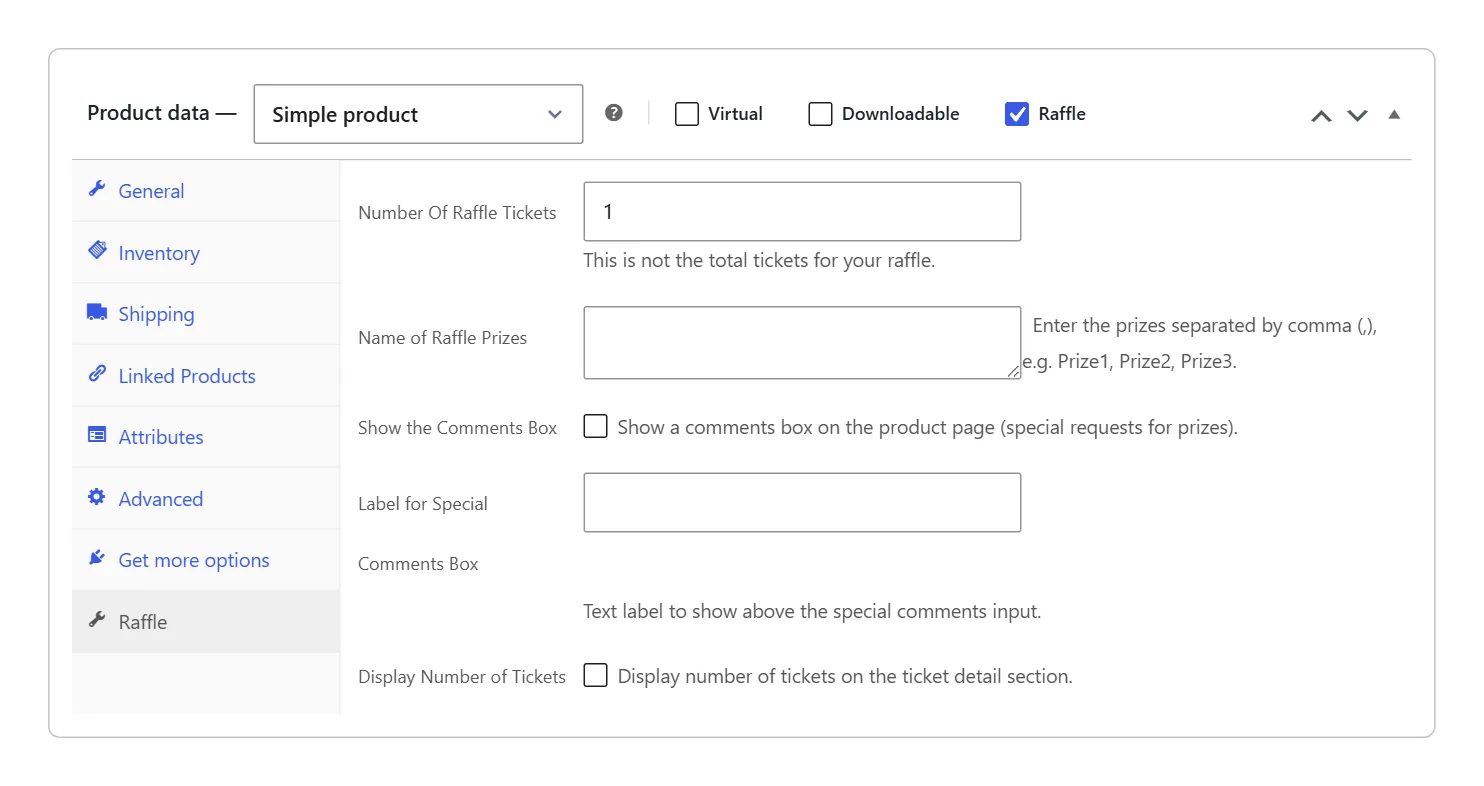
Name each package with its ticket count so buyers can compare at a glance, for example Jeep Wrangler - 5 Tickets or Porsche 911 - 15 Tickets (Best Value). The product title is what shows in the cart and on the order.
An Example Package Ladder
Here is how a three-tier raffle looks as WooCommerce products. The prices are only an example of the structure, not a recommendation for your raffle.
| Product name | Price | Number of tickets |
|---|---|---|
| Jeep Wrangler - 1 Ticket | $10 | 1 |
| Jeep Wrangler - 5 Tickets | $40 | 5 |
| Jeep Wrangler - 15 Tickets (Best Value) | $100 | 15 |
Each row is its own product in the Win a 2026 Jeep Wrangler category. Buyers pick the one they want on a normal WooCommerce product page and pay at your usual checkout.
Package Options by Edition
Every edition sells packages, including the free plugin, where a package is simply a product with a ticket amount. Gold and Platinum add controls for how many tickets are available and how bundles are offered.
| Option | Silver | Gold | Platinum |
|---|---|---|---|
| Ticket packages as WooCommerce products | ✓ | ✓ | ✓ |
| New Raffle wizard | ✓ | ✓ | ✓ |
| Total ticket stock (“Sold out” when gone) | × | ✓ | ✓ |
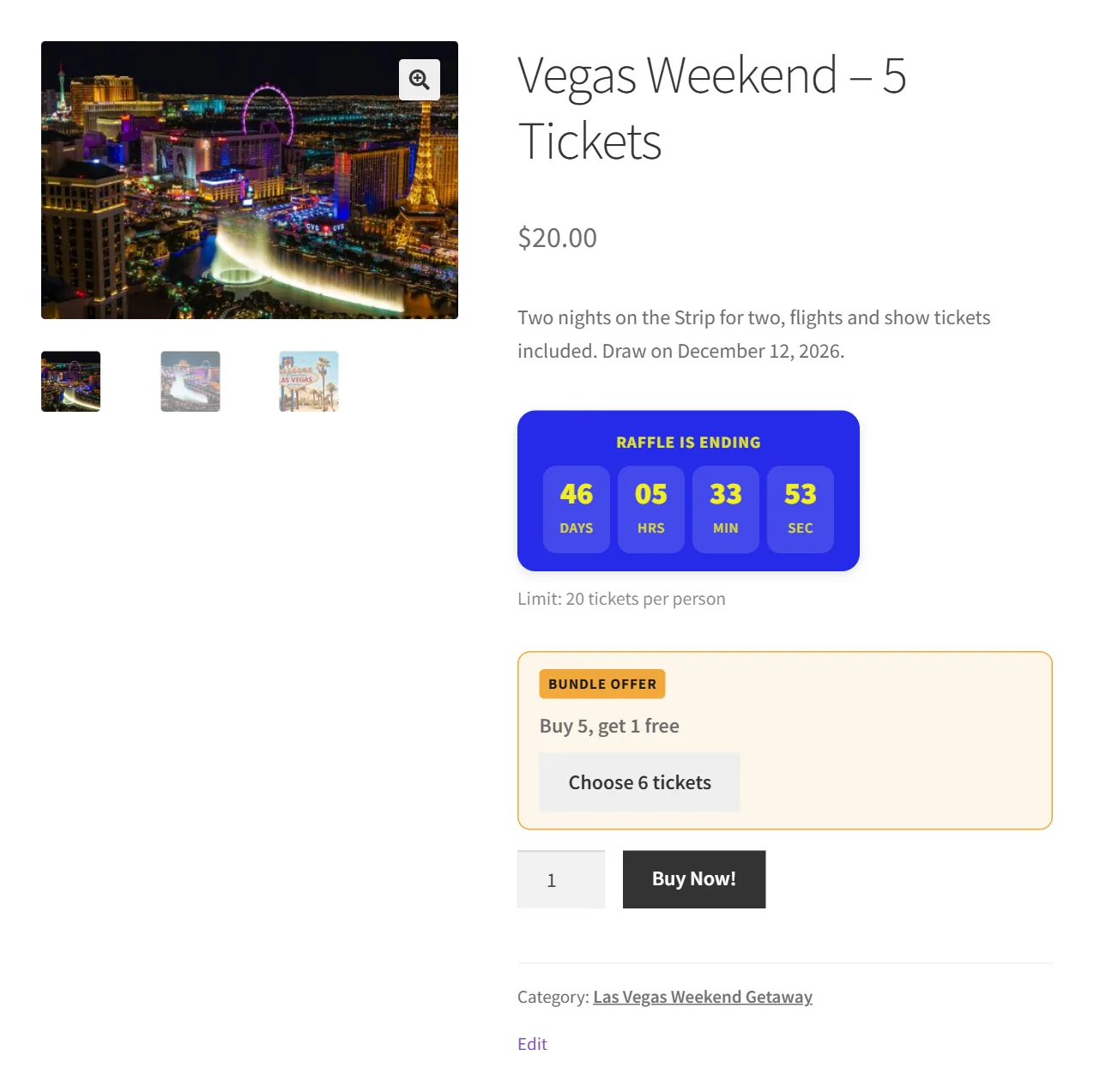
| Bundle offer (“buy 10, get 2 free”) | × | ✓ | ✓ |
| Limit tickets per customer | × | ✓ | ✓ |
| Pick Your Number | × | × | ✓ |
The bundle offer works alongside packages. You enter how many tickets the buyer pays for and how many they get free, the product page shows a button such as Choose 12 tickets, and the cart takes the free tickets off as a Bundle discount line. Every free ticket is a normal ticket in the draw.
See Pricing for the full comparison of Silver, Gold and Platinum.
Questions About Ticket Packages
Can a Buyer Purchase Two of the Same Package?
Yes. WPRaffle multiplies the package by the quantity, so a buyer who adds two 5-ticket packages to the cart gets 10 ticket numbers from that one order.
Can I Add a Package After the Raffle Starts?
Yes. Create a new product in the raffle’s category, tick Raffle, and give it a price and a number of tickets. The WPRaffle admin guide lists this as the way to add more packages to an existing raffle.
Can I Cap the Total Number of Tickets?
In WPRaffle Gold and Platinum, set Ticket stock in the raffle’s settings. Once the tickets sold reach that number, the raffle shows “Sold out” and can no longer be bought. Leave it blank for no limit.
When Do Buyers Get Their Ticket Numbers?
WPRaffle issues ticket numbers once the WooCommerce order is paid and reaches Processing or Completed. The numbers appear on the confirmation page and in the order email.
Do I Need a Separate Checkout for Raffle Tickets?
No. WPRaffle packages are WooCommerce products, so buyers use the checkout and payment methods your store already has. You need at least one payment method enabled in WooCommerce.
Start Selling Packages on Your Own Site
Ticket packages come with every edition of WPRaffle. Compare editions on the Pricing page, or open the documentation for the full admin guide.